
Real Estate CRM Comparison 2026: The Definitive Guide
Follow Up Boss vs kvCORE vs Sierra Interactive vs Lofty — pricing, features, integrations, and a decision framework to pick the right CRM for your business.
How much does BoldTrail (kvCORE) cost per month?
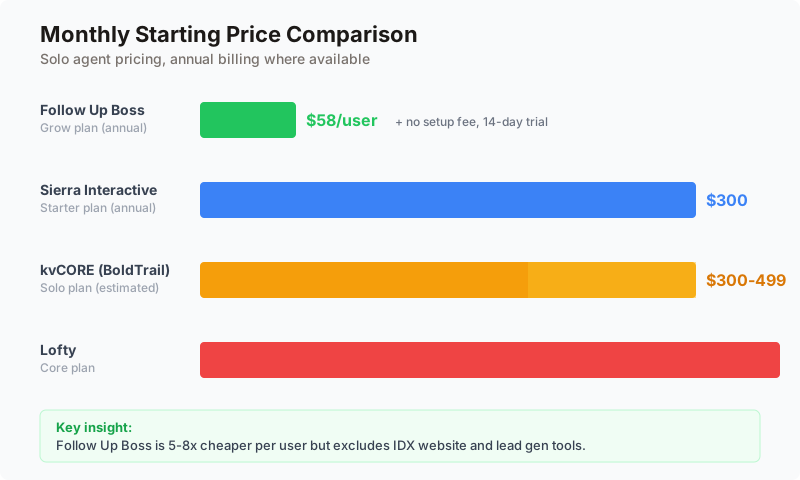
BoldTrail — formerly kvCORE — runs roughly $300 to $499 per user per month, making it one of the most expensive all-in-one real estate CRMs. Per-user pricing improves for teams, especially when a brokerage subsidizes seats. Below we compare it head-to-head with Follow Up Boss (from $58/user), Sierra Interactive ($300), and Lofty ($449).
1. Why Your CRM Choice Matters More Than Your Lead Source
Here's a stat that should change how you think about your tech stack: 72.5% of real estate agents have a CRM, but only 40% use it daily. That means a third of the industry is paying for software that collects dust while leads go cold in someone's inbox.
The problem isn't that agents are lazy. The problem is that most agents chose the wrong CRM. They bought a platform that doesn't match how they actually work, and now they're stuck in an annual contract with a tool that feels like homework instead of a competitive advantage.
According to the NAR 2025 Technology Survey, CRM ranks as the second most effective tool for generating quality leads (23% of agents), right behind social media (39%). But that number only reflects agents who actually use their CRM consistently. For those agents, CRM isn't just a database. It's the operating system of their business.
The real estate CRM market hit $4.73 billion in 2025 and is growing at 12.3% annually. That growth has attracted dozens of platforms, each promising to be the solution. But the market has consolidated around a clear set of leaders, and the choice between them comes down to one fundamental question: do you want a best-of-breed hub or an all-in-one platform?
This guide compares the four CRMs that dominate serious agent conversations in 2026: Follow Up Boss, kvCORE (BoldTrail), Sierra Interactive, and Lofty (formerly Chime). We'll cover pricing, features, integrations, real user ratings, and — most importantly — which platform fits which type of agent. No affiliate links, no sponsored rankings. Just the data.
2. The All-in-One vs. Best-of-Breed Decision
Before you compare features and pricing, you need to decide what shape of CRM you want. This is the single most important decision in your CRM search, and getting it wrong is the primary source of CRM regret in real estate.
Best-of-Breed: The Hub Model
A best-of-breed CRM does one thing exceptionally well: manage leads and relationships. It connects to your lead sources, your website, your dialer, your email marketing — all through integrations. Think of it as the brain of your operation. Each limb is a separate tool that you chose because it's the best at what it does.
Follow Up Boss is the defining example of this approach. It has 250+ integrations, an open API, and is designed to be the central hub that connects all your other tools. You pair it with whatever IDX website, lead generation platform, and marketing tools you prefer.
The upside: flexibility. If you find a better dialer, you swap it. If a new lead source emerges, you plug it in. Your CRM adapts to your business, not the other way around.
The downside: you're managing multiple vendor relationships, multiple logins, and multiple bills. If an integration breaks, you're troubleshooting between two companies that each blame the other.
All-in-One: The Suite Model
An all-in-one platform bundles CRM, IDX website, lead generation, marketing automation, and sometimes even transaction management into a single product. kvCORE, Sierra Interactive, and Lofty all take this approach.
The upside: one login, one bill, one support team. Everything is built to work together. When a lead registers on your IDX site, the CRM captures their behavior, triggers an automated campaign, and routes them to the right agent — all without Zapier or API configuration.
The downside: you're locked into their ecosystem. If their IDX websites are mediocre, that's what you're stuck with. If their dialer is clunky, too bad. You're trading flexibility for convenience, and the convenience comes with a higher price tag.
How to Decide
| Factor | Best-of-Breed (Follow Up Boss) | All-in-One (kvCORE / Sierra / Lofty) |
|---|---|---|
| You already have tools you love | Keep them, connect them | Replace them (or pay twice) |
| You want minimal setup | More initial configuration | Less setup, guided onboarding |
| Budget priority | Lower CRM cost, but total stack adds up | Higher single bill, but replaces 3-4 tools |
| Team size 1-3 | Often more cost-effective | Can be overkill |
| Team size 10+ | Scales well with per-user pricing | Brokerage pricing may be better |
| You run heavy PPC | Pair with dedicated landing pages | Built-in ad management |
| You value flexibility | Swap any tool anytime | Locked into their ecosystem |
3. The Comparison at a Glance
Before we break down each platform, here's the high-level comparison. Bookmark this table — you'll want to reference it as you read the detailed breakdowns below.
| Feature | Follow Up Boss | kvCORE (BoldTrail) | Sierra Interactive | Lofty |
|---|---|---|---|---|
| Type | Best-of-breed hub | All-in-one platform | All-in-one platform | All-in-one platform |
| Starting price | $58/user/month | ~$300-499/month | $299.95/month | $449/month |
| Free trial | 14 days | No | No | No |
| IDX website | No (integrate your own) | Yes | Yes (best-in-class) | Yes |
| Built-in lead gen | No | Yes | Yes (PPC focused) | Yes (33+ sources) |
| AI features | Basic (via integrations) | AI assistant/ISA | Sierra AI (conversational) | AI assistant + scoring |
| Integrations | 250+ | Limited | Moderate | Moderate |
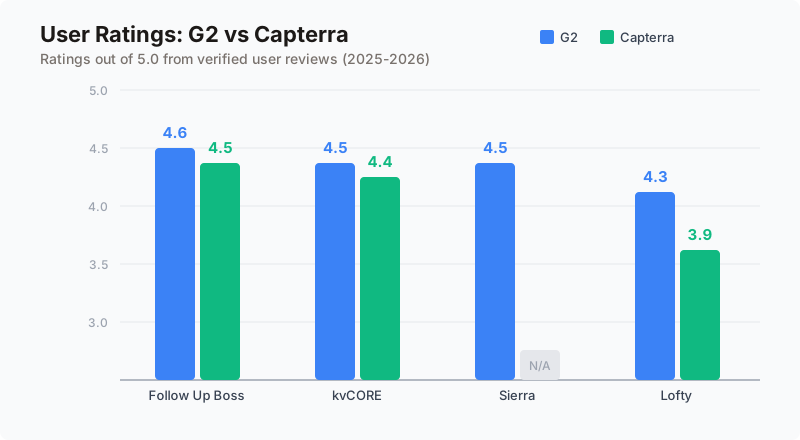
| G2 rating | 4.6/5 | 4.5/5 | 4.5/5 | 4.3/5 |
| Capterra rating | 4.5/5 | 4.4/5 | Limited data | 3.9/5 |
| Contract | Monthly available | Annual (typical) | Monthly or annual | Annual (typical) |
| Best for | Teams, multi-source leads | Brokerages, enterprises | PPC-heavy teams | AI-forward teams |
Now let's break each platform down in detail.
4. Follow Up Boss: The Integration King
Follow Up Boss is the CRM that most real estate coaches recommend, and there's a reason for that: it does one thing better than anyone else in the industry, and that one thing is connecting your lead sources to your agents with speed and accountability.
What Follow Up Boss Does Best
Follow Up Boss was built on a simple insight: real estate agents don't need another lead generation tool. They need a system that ensures the leads they already have get contacted quickly and followed up consistently. The platform's entire architecture reflects this philosophy.
When a lead comes in from Zillow, Follow Up Boss receives it via direct API sync in under 90 seconds — faster than any competitor. It routes that lead to the right agent based on your rules (round-robin, geographic, price-point, first-to-claim, or weighted distribution). The assigned agent gets a push notification on their phone. An automated action plan fires a text message within two minutes. Before the lead has finished browsing listings, they've already heard from your team.
This speed-to-lead advantage is measurable. Industry data shows that responding within five minutes increases contact rates by 100x compared to waiting 30 minutes. Follow Up Boss is engineered to make that five-minute window automatic rather than aspirational.
Integration Ecosystem
With 250+ native integrations, Follow Up Boss connects to virtually every tool in the real estate tech stack. That list includes every major lead source (Zillow, Realtor.com, Homes.com), every popular website platform (Real Geeks, Ylopo, BoomTown, CINC), marketing tools (Mailchimp, BombBomb), dialers (Mojo), transaction management platforms (Sisu, Dotloop), and workflow automation (Zapier). No other real estate CRM comes close to this breadth.
The open API means that even tools without native integrations can connect. If you use a niche lead source or a custom website, you can push leads into Follow Up Boss programmatically. For teams that generate leads from five or more sources, this is the defining advantage.
Pricing Breakdown
| Plan | Monthly Cost | Annual Cost | Users | Key Inclusions |
|---|---|---|---|---|
| Grow | $69/user | $58/user | Per user | Core CRM, lead routing, action plans, smart lists |
| Pro | $499 base | $416 base | Up to 10 | + Unlimited calling/texting, team features |
| Platform | $833 base | $833 base | Up to 30 | + Priority support, advanced reporting |
No setup fees. No annual contract required. A 14-day free trial on all plans. In a market where competitors charge $500-$1,500 in setup fees and lock you into annual contracts, Follow Up Boss's transparency is refreshing.
The catch: the Grow plan doesn't include built-in calling. You'll pay $33-39/user/month extra for calling, which effectively makes a solo agent's cost $91-108/month — still cheaper than all-in-one alternatives, but worth noting.
Where Follow Up Boss Falls Short
Follow Up Boss intentionally doesn't build everything in-house. There's no IDX website, no landing page builder, no PPC ad management, and no transaction management. If you want those, you're adding separate tools at separate costs.
For a solo agent who just needs a CRM and a website, the total stack cost (Follow Up Boss + IDX website provider + lead generation) can approach or exceed an all-in-one platform. The savings show up at the team level, where per-user pricing scales better.
The Verdict on Follow Up Boss
Follow Up Boss is the right CRM if you already have lead sources you love and you want a clean, fast system to route, track, and follow up on those leads. It's the wrong CRM if you're starting from scratch and want one platform to handle everything from website to closing.
5. kvCORE (BoldTrail): The Brokerage Workhorse
kvCORE, now being rebranded as BoldTrail by parent company Inside Real Estate, is the platform that brokerages and large teams default to when they want to give every agent a complete tech stack without managing 15 different vendor relationships.
What kvCORE Does Best
kvCORE is built from the ground up as a lead generation machine. Its IDX website doesn't just display listings — it forces visitor registration after a set number of views, captures behavioral data (which listings they viewed, how long they spent, what price range they're browsing), and immediately routes those captured leads into automated drip campaigns.
For brokerages, the platform's roster management is unmatched. Admins can set up agent-specific websites, manage company-wide lead routing rules, track agent activity and accountability, and run consolidated reporting across hundreds of agents. No other platform handles brokerage administration as thoroughly.
The Smart CMA tool generates comparative market analyses that agents can send to prospective sellers, and the automated market reports keep your database warm by sending monthly home value updates to past clients and prospects. These features directly support listing acquisition, which is why many agents use kvCORE's marketing tools even when they prefer a different CRM for day-to-day lead management.
The Pricing Problem
kvCORE's biggest weakness is also its most controversial: you can't find out what it costs without getting on a sales call. There's no public pricing page. Based on aggregated user reports and review data, here's what agents typically pay (for the full breakdown including add-ons, contract terms, and negotiation tactics, see our BoldTrail Pricing Guide; for what agents actually say after using it, see our BoldTrail Reviews 2026):
| Tier | Estimated Monthly Cost | Setup Fee | Contract |
|---|---|---|---|
| Solo agent | $300-499 | $500-1,500 | Annual (typical) |
| Small team (up to 5) | $449-599 | Varies | Annual |
| Brokerage (150+ agents) | $1,500+ | Custom | Annual |
Compare that to Follow Up Boss's publicly listed $58-69/user/month with no setup fees and monthly billing. The opacity isn't just annoying — it's a signal. When a platform won't tell you the price, it's because the price varies based on what they think you'll pay. That's not a partnership. That's a negotiation.
The kvCORE User Experience
kvCORE has 1,500+ reviews on G2 (4.5/5) and 540+ reviews on Capterra (4.4/5), giving it the largest review volume of any real estate CRM. That volume reveals a pattern: users love the feature depth but consistently complain about three things.
First, performance. Multiple reviewers describe the platform as "sluggish" with slow load times. When you're trying to pull up a contact's record during a phone call, lag is more than annoying — it's a missed opportunity.
Second, complexity. kvCORE tries to do everything, which means there's a lot to learn. Small teams without a dedicated admin often describe setup as "a second job." The platform's power is directly proportional to the time you invest in configuring it.
Third, cancellation. Annual contracts are the default, and users report that canceling is difficult. This is a common complaint across all-in-one platforms, but kvCORE gets called out more frequently for it.
The Verdict on kvCORE
kvCORE makes sense when a brokerage is providing it to agents as part of their technology package (reducing or eliminating the per-agent cost) or when a team needs one platform to replace five separate tools. It does not make sense for a solo agent who values simplicity, transparent pricing, or the ability to leave without penalty.
Your CRM manages leads. Something has to generate them.
RobinFlow sits upstream of your CRM — branded landing pages with question flows that qualify seller leads before they hit your pipeline. Works with Follow Up Boss, kvCORE, Sierra, Lofty, or any CRM.
6. Sierra Interactive: The PPC Powerhouse
Sierra Interactive is the platform that teams running serious paid advertising campaigns gravitate toward. If you're spending $2,000 or more per month on Google Ads, Sierra's integration between ad management, IDX website, and CRM creates a tighter feedback loop than any competitor.
What Sierra Interactive Does Best
Sierra's IDX websites are widely considered the best in the industry — fast loading, mobile-optimized, and designed from the ground up for lead conversion. The forced registration functionality is configurable (register after 3 views, register to see photos, register to save searches), giving agents fine-tuned control over the conversion-versus-experience tradeoff.
But the real differentiator is Sierra AI. This conversational AI engages leads via text message, qualifying them through natural-language conversations. When a lead registers on your site, Sierra AI can text them within minutes, ask qualifying questions ("Are you currently working with an agent?" "What's your timeline for selling?"), and route only qualified leads to human agents. For teams handling hundreds of leads per month, this AI layer can replace the cost of a full-time ISA (inside sales agent) at a fraction of the price.
Sierra's Google Ads management service handles campaign creation, keyword bidding, and ad optimization for a 10% management fee on top of your ad spend. The minimum ad spend is $500/month, so this isn't for agents dabbling in paid — it's for teams committed to PPC as a primary lead channel.
Pricing: Transparent but Premium
Sierra Interactive is one of the few all-in-one platforms that publishes its pricing publicly. That transparency is worth noting, even if the prices themselves are premium.
| Plan | Annual Billing | Monthly Billing | Users Included |
|---|---|---|---|
| Starter | $299.95/month | $359.95/month | 1 |
| Essential | $399.95/month | $474.95/month | 3 |
| Growth | $599.95/month | $724.95/month | 5 |
A $500 setup fee applies but is waived for annual commitments. Additional users can be added as your team grows. Google Ad management adds a 10% fee on top of your ad spend.
At $300/month for a single user, Sierra is clearly positioned for agents who are generating enough revenue to justify the investment. If you're doing fewer than 12 transactions a year, this probably isn't your platform.
Where Sierra Falls Short
Sierra Interactive's review volume is notably lower than its competitors. While the ratings are strong (4.5-4.7 on G2), they come from a small sample. This makes it harder to vet the platform through peer reviews alone. Sierra's reputation is largely built through coaching community endorsements and word-of-mouth among top-producing teams.
The platform's integration ecosystem is moderate — not as locked-down as kvCORE, but nowhere near Follow Up Boss's 250+ connections. If you use niche tools or have an existing tech stack you want to preserve, check Sierra's integration list carefully before committing.
The Verdict on Sierra Interactive
Sierra Interactive is the right choice for teams that treat paid advertising as their primary lead generation channel and want the tightest possible connection between their ads, website, and CRM. The AI qualification layer is a genuine differentiator. It's the wrong choice for agents who don't run paid ads or who want the flexibility to connect a wide range of third-party tools.
7. Lofty (Formerly Chime): The AI Experiment
Lofty, which rebranded from Chime in 2023, positions itself as the most AI-forward CRM in real estate. It's also the platform with the most polarizing reviews — users either praise its automation capabilities or describe its support as "the absolute worst." There isn't much middle ground.
What Lofty Does Best
Lofty's standout feature is Social Studio, a built-in social media management tool that handles content creation, scheduling, and publishing across Facebook, Instagram, LinkedIn, and Twitter. No other real estate CRM includes this functionality natively. If social media is a significant part of your marketing strategy, Lofty eliminates the need for a separate social scheduling tool like Buffer or Hootsuite.
The AI assistant handles initial lead qualification through text-based conversations, similar to Sierra AI. Lofty's AI also powers lead scoring, prioritizing contacts based on behavioral signals (website activity, email opens, property saves). Smart Plans automate multi-channel follow-up sequences, and the dynamic CMA tool helps agents win listing appointments with data-driven presentations.
With integrations to 33+ lead sources, Lofty can centralize leads from Zillow, Realtor.com, Facebook ads, Google ads, your website, and open house sign-ins into a single pipeline. The platform's breadth is impressive on paper.
Pricing: Expensive with Hidden Costs
Lofty doesn't publish detailed pricing, but based on review data and comparison sites, the cost structure looks like this:
| Component | Cost | Notes |
|---|---|---|
| Core plan | $449/month | Base platform access |
| Enterprise plan | Up to $1,500/month | Larger teams, premium features |
| Setup fee | $299-$1,499 | One-time, varies by plan |
| Ad management fee | 15-20% of ad spend | Higher than Sierra's 10% |
| AI Sales Agent | $60/month per 200 leads | Additional cost beyond base plan |
That ad management fee is worth highlighting: at 15-20%, Lofty takes a significantly larger cut of your advertising budget than Sierra Interactive (10%) or managing ads yourself (0%). On $3,000/month in ad spend, that's $450-600/month in management fees alone — on top of the $449 base subscription. Your total Lofty cost could easily exceed $1,000/month before you count the ads themselves.
The Review Problem
Lofty carries the lowest user ratings of the four platforms in this comparison. Its G2 rating is 4.3/5 (from 389 reviews), and its Capterra rating is 3.9/5 (from 125 reviews). The common thread across negative reviews is customer support: slow response times, unresolved tickets, and difficulty reaching a human when problems arise.
The platform's complexity is the other recurring complaint. Smart Plans and automation workflows are powerful but require significant time to configure. Agents without technical backgrounds describe the setup process as "insanely convoluted." When your CRM creates more work than it eliminates, something is fundamentally wrong with the product-market fit.
The Chime-to-Lofty rebrand also created confusion. Some agents report being unclear on which features transferred, what changed in their pricing, and whether their contract terms shifted. Rebrands are routine in SaaS, but they shouldn't create uncertainty for existing customers.
The Verdict on Lofty
Lofty is the right CRM if you have the technical patience to configure complex automation workflows, want built-in social media management, and are willing to accept below-average support in exchange for AI-forward features. It's the wrong CRM if you value simplicity, transparent pricing, or responsive support. The 3.9 Capterra rating should give any buyer pause.
8. Feature-by-Feature Deep Dive
Now that you've seen each platform's strengths and weaknesses, let's compare specific features head-to-head. These are the features that agents tell us matter most when choosing a CRM.
Lead Routing
Lead routing determines which agent gets which lead. For solo agents this is irrelevant, but for teams of two or more, it's the single most important CRM feature.
| Platform | Routing Options | Speed | Customizability |
|---|---|---|---|
| Follow Up Boss | Round-robin, first-to-claim, weighted, geographic, price-based | Under 90 seconds (Zillow direct API) | Highly customizable |
| kvCORE | Round-robin, geographic, behavioral | Varies by lead source | Moderate |
| Sierra Interactive | Round-robin, geographic, custom rules | Fast (integrated website) | Good |
| Lofty | Round-robin, geographic, AI-scored | Varies | Moderate (requires configuration) |
Follow Up Boss wins on routing flexibility and speed. Its direct Zillow API integration delivers leads faster than any competitor. For teams where speed-to-lead is a competitive advantage (and it always is), this matters.
Automation and Follow-Up
Every platform offers automated follow-up sequences, but the execution varies significantly.
Follow Up Boss Action Plans are straightforward: define a series of emails, texts, and tasks triggered by a lead action. They're easy to set up, easy to modify, and they work. The simplicity is the feature.
kvCORE Smart Campaigns use behavioral triggers — if a lead views a property in a certain price range, the system automatically sends comparable listings. This behavioral layer is genuinely useful for long-term nurture, but requires more setup time.
Sierra AI goes beyond drip campaigns by engaging leads in conversational text exchanges. The AI asks qualifying questions and escalates warm leads to human agents. This is the closest any platform comes to replacing a human ISA.
Lofty Smart Plans are the most complex automation system in this comparison. They're powerful but require significant configuration time. Agents who invest in setup report strong results; agents who don't invest describe them as confusing.
Website and IDX
| Platform | Built-in Website | Quality | Forced Registration | Behavioral Tracking |
|---|---|---|---|---|
| Follow Up Boss | No | N/A (use your own) | N/A | Pixel tracking on partner sites |
| kvCORE | Yes | Good | Yes (configurable) | Yes (comprehensive) |
| Sierra Interactive | Yes | Best-in-class | Yes (granular control) | Yes (industry-leading) |
| Lofty | Yes | Good | Yes | Yes |
If you need a high-converting IDX website as part of your CRM platform, Sierra Interactive is the clear winner. Their websites load faster, convert better, and offer more customization than kvCORE or Lofty. If you already have a website you like (or work with a provider like Ylopo or Real Geeks), Follow Up Boss lets you keep it.
Mobile Experience
Agents spend 60% or more of their CRM time on mobile — during property tours, at open houses, between client meetings. Mobile experience isn't a nice-to-have; it's where the CRM lives or dies.
Follow Up Boss consistently receives the highest mobile app ratings among real estate CRMs. In-app calling, texting, and contact lookup are smooth and fast. kvCORE's mobile app has improved but users still report lag. Sierra and Lofty's mobile experiences are adequate but not standout.
Reporting and Accountability
For team leaders and brokerage managers, reporting determines whether agents are actually using the CRM or just saying they are.
Follow Up Boss tracks calls made, texts sent, emails opened, and lead response times by agent. The team leaderboard creates healthy competition. kvCORE offers brokerage-level reporting across agent rosters. Sierra provides agent accountability dashboards. Lofty includes reporting but requires more configuration to get actionable insights.
9. Total Cost of Ownership: What You'll Actually Pay
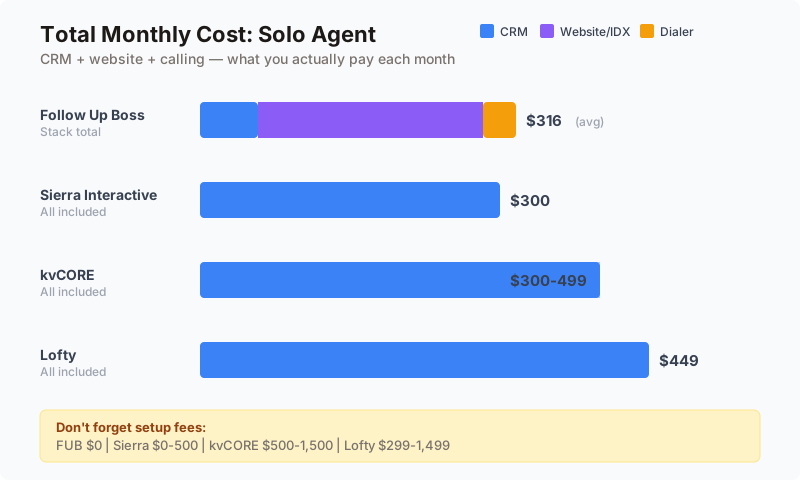
Sticker price is misleading. A $58/month CRM might cost $300/month when you add the tools it doesn't include. A $499/month all-in-one might actually save money by replacing four separate subscriptions. Here's what a realistic tech stack costs with each platform.
Solo Agent Scenario
An agent doing 15-25 transactions per year, working solo, who needs CRM, a website, and basic lead generation.
| Component | Follow Up Boss Stack | kvCORE | Sierra Interactive | Lofty |
|---|---|---|---|---|
| CRM | $58/month (Grow, annual) | Included | Included | Included |
| IDX website | $150-300/month (third party) | Included | Included | Included |
| Dialer | $33/month (FUB calling addon) | Included | Included | Included |
| Base monthly cost | $241-391 | $300-499 | $299.95 | $449 |
| Setup fees | $0 | $500-1,500 | $0-500 | $299-1,499 |
| Contract minimum | None | Annual | None (annual saves $) | Annual |
For a solo agent, Sierra Interactive's Starter plan at $299.95/month (with annual billing) offers the best all-in-one value. Follow Up Boss's total stack cost depends entirely on which website provider you choose. kvCORE and Lofty are the most expensive options for a single user.
Team Scenario (5 Agents)
A team of five agents managing 60-100 transactions per year, running $2,000/month in PPC advertising.
| Component | Follow Up Boss Stack | kvCORE | Sierra Interactive | Lofty |
|---|---|---|---|---|
| CRM base | $416/month (Pro, annual) | $449-599 | $599.95 (Growth) | $449-1,000 |
| IDX website | $200-400/month | Included | Included | Included |
| Ad management | Self-managed ($0) | Self-managed | $200/month (10% of $2K) | $300-400/month (15-20% of $2K) |
| Total monthly | $616-816 | $449-599 | $799.95 | $749-1,400 |
At the team level, kvCORE's per-user economics start making sense — especially if the brokerage subsidizes the cost. Follow Up Boss's Pro plan at $416/month for 10 users is competitive when you account for the separate website cost. Sierra and Lofty's ad management fees add meaningful cost for PPC-heavy teams.
10. How to Actually Choose: The Decision Framework
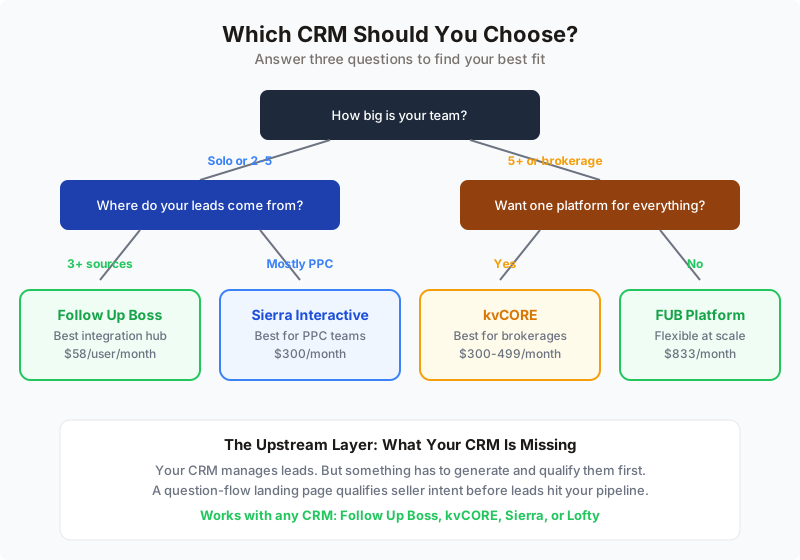
Enough comparing. Here's a framework for making the decision. Answer these five questions and the right CRM will be obvious.
Question 1: Where Do Your Leads Come From?
If you generate leads from three or more sources (Zillow, your website, social media, open houses, referrals), you need a CRM that integrates with all of them. Follow Up Boss's 250+ integrations make it the default choice for multi-source lead management.
If you generate most of your leads from one channel (primarily PPC, for example), an all-in-one platform that handles both lead generation and CRM makes more sense. Sierra Interactive or kvCORE's built-in ad management eliminates the need for separate tools.
Question 2: How Big Is Your Team?
Solo agents have different needs than teams of 20. Here's the simplified recommendation:
| Team Size | Best Fit | Why |
|---|---|---|
| Solo agent, under $100K GCI | Follow Up Boss Grow or Wise Agent | Low cost, simple setup, month-to-month |
| Solo agent, $100K+ GCI | Follow Up Boss or Sierra Starter | Depends on lead source strategy |
| Team of 2-5 | Follow Up Boss Pro or Sierra Essential | Routing, accountability, calling included |
| Team of 5-15 | Follow Up Boss Pro or kvCORE | Scale benefits, brokerage tools for kvCORE |
| Brokerage (15+) | kvCORE or Follow Up Boss Platform | Agent roster management, company reporting |
Question 3: What's Your Technical Comfort Level?
Be honest about this. If you struggle with technology, a platform with a steep learning curve (kvCORE, Lofty) will become shelfware. Follow Up Boss is consistently praised for its intuitive UI. Sierra's setup is straightforward for users familiar with web-based tools.
If you have a dedicated admin or operations manager, complexity is less of a concern — and the deeper automation of kvCORE or Lofty can be fully leveraged.
Question 4: Do You Run Paid Advertising?
If paid advertising is a significant part of your lead generation strategy ($1,000+/month in ad spend), platforms with built-in ad management (Sierra, kvCORE, Lofty) streamline the ad-to-CRM pipeline. The integration between ad campaigns and lead follow-up is tighter when everything lives in one platform.
If you don't run paid ads or spend less than $500/month, built-in ad management has no value. Don't pay for features you won't use.
Question 5: How Important Is Flexibility?
If you want the ability to swap tools, test new vendors, or integrate new products as they emerge, Follow Up Boss's open ecosystem is the clear winner. If you want simplicity and don't mind being locked into an ecosystem, an all-in-one platform reduces decision fatigue.
11. The CRM Is Not the Lead Source: Where Lead Generation Actually Happens
Here's the misconception that costs agents the most money: believing that buying a CRM will generate leads. It won't. A CRM manages leads. It organizes, routes, and automates follow-up for leads that already exist. But the leads have to come from somewhere — and which seller lead platform you feed into your CRM matters as much as which CRM you choose.
This distinction matters because the all-in-one platforms (kvCORE, Sierra, Lofty) blur the line between CRM and lead generation. Yes, they include IDX websites and ad management. But an IDX website without traffic is just a pretty page. Ad management without a budget is just a dashboard. The platform provides the tools; you provide the leads.
The Lead Generation Stack
Regardless of which CRM you choose, your lead generation strategy needs to address three levels:
Level 1: Capture. How do you convert a stranger into a lead? This is where landing pages, IDX registration, home valuation pages, and ad campaigns live. It's the top of your funnel.
Level 2: Qualify. How do you separate tire-kickers from serious prospects? This is where AI qualification, intake questions, and behavioral scoring add value. Not every lead deserves a phone call.
Level 3: Nurture. How do you stay in front of leads who aren't ready to act today but will be in 6-12 months? This is where your CRM's drip campaigns, market reports, and automated touchpoints earn their keep.
Your CRM handles Levels 2 and 3. But Level 1 — the actual lead capture — often requires a dedicated tool that sits upstream of the CRM. A branded landing page with a question-based flow qualifies leads before they ever hit your CRM, so your CRM pipeline starts with better leads, not just more leads.
This is the approach that separates agents doing 30 transactions from agents doing 60: the quality of what goes into the CRM matters as much as what the CRM does with it.
Why the Upstream Layer Matters
Consider two agents. Agent A dumps every Zillow inquiry directly into Follow Up Boss. They get 100 leads per month, 3% convert, and they close 3 deals. Agent B runs those same Zillow inquiries through a qualification step first — a branded landing page that asks three questions about timeline, motivation, and property condition. Only 40 leads make it through, but 12% convert, and Agent B closes nearly 5 deals from fewer leads with less follow-up work.
The CRM didn't change. The leads got better before they arrived.
This upstream qualification layer is CRM-agnostic. It works with Follow Up Boss, kvCORE, Sierra, Lofty, or any other CRM that accepts inbound leads. And it's the layer that most agents are missing entirely — they optimize their CRM workflows while ignoring the quality of what enters those workflows.
Better leads in, better results out
A question-flow landing page that asks about timeline, motivation, and property condition gives your CRM pre-qualified leads instead of raw contact info to chase.
12. Other CRMs Worth Considering
Follow Up Boss, kvCORE, Sierra Interactive, and Lofty get the most attention, but they're not the only options. Depending on your budget, team size, and use case, these alternatives might be a better fit.
Budget-Friendly Options
LionDesk starts at $25/month (Starter) and goes up to $83/month (Elite). It's a solid entry-level CRM with a unique video texting feature that helps agents stand out in follow-up. Best for agents doing 10-20 deals/year who need basic lead management without the cost of a premium platform.
Wise Agent runs $50-120/month and has a loyal following among agents doing 15-40 deals per year. It's simple, reliable, and includes transaction management — something most CRMs charge extra for or don't offer. Best for agents who want a proven, no-frills CRM that just works.
Premium Alternatives
CINC starts at $900+/month and includes leads in every plan — you can't buy the CRM without the lead generation. If you want a done-for-you lead gen system, CINC delivers. But you're paying for leads whether you need them or not, and the platform leans heavily toward buyer leads. See our RobinFlow vs CINC comparison for a detailed breakdown of CINC's seller lead economics, or our seller lead generation guide for strategies that don't require a $900/month commitment.
BoomTown runs $1,000-$1,750/month and is built for large teams with high lead volume. Like CINC, it bundles lead generation with CRM. BoomTown's recent acquisition by Inside Real Estate (the same company behind kvCORE) means its future is being merged into the BoldTrail ecosystem.
Real Geeks starts at $349/month and offers a balanced all-in-one experience at a price point between Follow Up Boss and the premium platforms. Its IDX websites are solid, and the CRM is straightforward. Best for agents who want an all-in-one at a moderate price without the complexity of kvCORE or Lofty.
The "Good Enough" Question
Here's an uncomfortable truth: for many agents, a $49/month CRM (LionDesk Pro+) paired with disciplined daily use will outperform a $499/month platform used sporadically. The NAR data is clear — CRM produces quality leads for 23% of agents, but most agents aren't using their CRM daily. If you're choosing between a premium CRM you might use and a budget CRM you will use, pick the one you'll use.
| CRM | Starting Price | Best For | Includes Leads? | Free Trial |
|---|---|---|---|---|
| LionDesk | $25/month | New agents, tight budget | No | Yes |
| Wise Agent | $50/month | Solo agents, 15-40 deals/year | No | Yes (14 days) |
| Real Geeks | $349/month | Solo/small team all-in-one | No | No |
| CINC | $900/month | Teams wanting done-for-you leads | Yes | No |
| BoomTown | $1,000/month | Large teams, high volume | Yes | No |
13. CRM Migration: How to Switch Without Losing Your Pipeline
If you're reading this guide, there's a good chance you already have a CRM and you're thinking about switching. Here's the reality: CRM migration is painful, but it doesn't have to be catastrophic.
The Cost of Switching
The average agent loses 2-4 weeks of productivity during a CRM migration. That's not the software's fault — it's the time spent exporting data, cleaning contacts, re-building automations, and retraining muscle memory. If you close $10,000 per transaction and do 2 deals per month, a 2-week productivity hit costs you $10,000. Factor that into your CRM comparison math.
Migration Checklist
Before you pull the trigger on a new CRM, complete this checklist:
- Export your contacts as CSV. Every CRM allows this. Make sure the export includes phone numbers, email addresses, tags/categories, lead source, last activity date, and notes. Run the export twice and compare — some CRMs truncate data on the first pass.
- Document your automations. Screenshot every action plan, drip sequence, and follow-up workflow. You'll need to rebuild these in the new platform, and working from memory leads to gaps.
- Run both CRMs in parallel for 2 weeks. Don't cold-turkey switch. Keep your old CRM active for existing leads while routing new leads to the new platform. This prevents any lead from falling through the cracks during transition.
- Clean your database before importing. Migration is the perfect time to remove dead contacts, update phone numbers, and standardize tags. A clean import into a new CRM is faster and more effective than importing a messy database.
- Test integrations before committing. Connect your lead sources to the new CRM and verify that leads flow correctly. Don't sign an annual contract until you've confirmed that your critical integrations work.
When to Stay Put
Switching CRMs isn't always the answer. If your current CRM does 80% of what you need and you're just frustrated with the other 20%, the cost of migration might exceed the benefit of the upgrade. Consider whether the problem is the platform or your usage of it. Sometimes a 30-minute training session fixes what you thought was a software problem.
14. Common CRM Mistakes That Kill Your ROI
Choosing the right CRM is step one. Using it correctly is step two. These are the mistakes we see agents make most frequently, regardless of which platform they use.
Mistake 1: Buying Features You'll Never Use
A solo agent paying $449/month for Lofty's Social Studio, AI assistant, dynamic CMA, and transaction management — but only using the contact database and email — is burning $300/month on features that might as well not exist. Start with the cheapest plan that covers your actual daily workflow. Upgrade when you've maxed out what the current plan can do.
Mistake 2: Not Setting Up Automation on Day One
Your CRM's automated follow-up sequences are the single highest-ROI feature. Yet most agents don't set them up for weeks or months after purchase. Set up at least three action plans before you import a single contact: one for new leads, one for warm leads being nurtured, and one for past clients. If you do nothing else, these three automations will pay for your CRM subscription.
Mistake 3: Ignoring Speed-to-Lead
When a lead comes in, the clock starts. Responding within 5 minutes increases your contact rate by 100x compared to 30 minutes. Yet most agents don't have their CRM configured for instant notification and automated first response. If your CRM can send an automated text within 2 minutes of a new lead arriving, turn that feature on today. It's the easiest win in real estate technology.
Mistake 4: Treating the CRM as a Rolodex
Your CRM is not a place to store contacts. It's a system for managing relationships over time. If you're entering contacts but not tagging them, not assigning them to drip campaigns, and not logging your interactions, your CRM is just an expensive spreadsheet. The value is in the workflow, not the data storage.
Mistake 5: Switching CRMs Instead of Using the One You Have
The grass-is-greener trap is real. Agents who switch CRMs every 12-18 months never build the pipeline depth that comes from 2-3 years of consistent use on one platform. Your CRM's value compounds over time: contact histories get richer, automations get refined, and your database generates more referrals. Every switch resets that clock.
15. Integrating Your CRM with Your Lead Generation System
Your CRM sits at the center of your tech stack, but it needs to connect to the tools that feed it. Here's how each platform handles the most common integrations.
Lead Source Integrations
The most critical integration is between your lead sources and your CRM. Every minute between lead capture and CRM entry is a minute your automated follow-up isn't running.
Follow Up Boss has direct API integrations with Zillow (sub-90-second delivery), Realtor.com, Homes.com, and 250+ other sources. Any lead source with an API or email notification can connect. This is FUB's defining advantage.
kvCORE generates leads internally through its IDX website and ad platform, so the "integration" is native — leads go straight from the website into the CRM. For external lead sources, kvCORE's options are more limited.
Sierra Interactive similarly captures leads through its own website and ad campaigns. Leads from external sources can be imported via Zapier or manual upload. The integration with Follow Up Boss (yes, some agents use both) allows Sierra to serve as the website/lead gen layer while FUB handles CRM duties.
Lofty connects to 33+ lead sources natively. That's a solid number but well below Follow Up Boss's 250+. If your lead source isn't in Lofty's supported list, you'll need Zapier as a bridge.
The Upstream Lead Capture Layer
The most sophisticated agents add a lead capture and qualification layer that sits between their advertising and their CRM. Instead of sending ad traffic directly to an IDX website (where leads register with minimal qualification), they send traffic to branded landing pages that ask qualifying questions.
A homeowner clicking on a "What's my home worth?" ad lands on a page that asks about their timeline, property condition, reason for selling, and whether they're working with an agent. By the time this lead reaches the CRM, the agent knows whether it's worth a phone call or a drip sequence.
This upstream layer works with any CRM. The qualified lead data pushes into Follow Up Boss via webhook, into kvCORE via email parsing, into Sierra via Zapier, or into Lofty via their API. The CRM doesn't care where the lead came from — it just receives better-qualified leads with richer data.
If you're interested in building this kind of lead capture system, our guide on seller lead landing pages that convert walks through the page design, question flow, and follow-up sequence step by step. For agents focused on home valuations as their primary lead magnet, our home valuation funnel guide covers the full strategy from AVM delivery to CMA presentation.
Transaction Management Integration
Only Wise Agent includes transaction management in the base CRM. For the four platforms in this comparison, you'll typically integrate with Dotloop, SkySlope, or a brokerage-provided transaction platform. Follow Up Boss connects to most transaction management tools natively. kvCORE, Sierra, and Lofty have more limited options — check compatibility before committing.
16. The 2026 CRM Landscape: What's Changing
The real estate CRM market is in the middle of three significant shifts that will affect your platform choice over the next 12-24 months.
Shift 1: AI Is Becoming Table Stakes
The NAR 2025 Technology Survey found that 21% of agents are already using AI-powered CRM features. By the end of 2026, that number will likely double. Every major CRM is racing to add AI capabilities: automated lead qualification, smart response suggestions, predictive lead scoring, and conversational AI for initial engagement.
Sierra AI and Lofty's AI assistant are the most mature implementations today. Follow Up Boss is adding AI capabilities through integrations (partnering with AI tools like Structurely and Ylopo AI) rather than building them in-house. kvCORE's AI features are growing through the BoldTrail rebrand.
What this means for your decision: don't pay a premium for AI features today that will be standard everywhere in 18 months. AI is a factor, but it shouldn't be the deciding factor.
Shift 2: Market Consolidation
Inside Real Estate now owns kvCORE, BoomTown, and several other real estate tech brands, and they're merging them under the BoldTrail umbrella. This consolidation means that agents currently on BoomTown or kvCORE may face platform migrations, feature changes, or pricing adjustments they didn't sign up for.
Follow Up Boss remains independently operated (owned by Zillow Group since 2022 but run as a separate product). Sierra Interactive is independently owned. Lofty is backed by private equity.
What this means for your decision: if you're committing to an annual contract, understand who owns the platform and what their consolidation strategy looks like. A CRM that merges with another product in 12 months might change significantly.
Shift 3: The Post-NAR-Settlement Landscape
The NAR settlement that took effect in August 2024 changed how buyer agent compensation works. The ripple effect on CRM is subtle but real: agents are more focused on listing acquisition (where compensation is clearer), and CRM features that support seller lead management — CMAs, market reports, listing presentation tools — are becoming more important than buyer search automation.
kvCORE's Smart CMA and automated market reports directly support seller outreach. Sierra's behavioral tracking can identify homeowners who are researching selling. Follow Up Boss's smart lists can segment your database by "likely to sell" criteria. These seller-focused CRM features will become increasingly important through 2026 and beyond.
For a deeper dive into seller lead strategies that work regardless of your CRM, see our complete seller lead generation guide.
17. The Final Verdict: Our Rankings
After analyzing pricing, features, user ratings, integrations, and total cost of ownership, here's where each platform stands.
Best Overall CRM: Follow Up Boss
Follow Up Boss wins for the majority of agents and teams because it combines the best integration ecosystem with the cleanest user experience, transparent pricing, and no long-term commitment required. Its 4.6 G2 rating and 92% customer satisfaction score reflect a platform that consistently delivers on its promises.
The open-ecosystem approach means your CRM investment is never wasted. If you add a new lead source next year, Follow Up Boss will integrate with it. If you want to test a new website platform, you don't have to change your CRM. That flexibility has compounding value over time.
Best All-in-One for Teams: Sierra Interactive
For teams running $2K+/month in PPC who want website, CRM, and ad management in one platform, Sierra Interactive delivers the strongest integrated experience. Its IDX websites are best-in-class, its AI qualification is genuinely useful, and its pricing is publicly listed — a rarity among all-in-one platforms.
Best for Brokerages: kvCORE (BoldTrail)
kvCORE's roster management, company-wide reporting, and ability to provision agent accounts at scale make it the default for brokerages that want to offer a complete tech stack to their agents. The economics work when the brokerage subsidizes the per-agent cost, making it "free" (or nearly so) for individual agents.
Proceed with Caution: Lofty
Lofty's Social Studio is innovative and its AI features are ambitious, but the platform's below-average user ratings (3.9 Capterra, 4.3 G2) and consistently poor support reviews make it a risky investment. The high ad management fees (15-20%) further erode its value proposition. We'd recommend trying other platforms first unless Social Studio is a must-have feature for your business.
| Platform | Our Rating | Best For | Watch Out For |
|---|---|---|---|
| Follow Up Boss | A | Teams, multi-source leads, flexibility | No built-in website or lead gen |
| Sierra Interactive | A- | PPC teams, IDX website quality | Premium pricing, limited review volume |
| kvCORE (BoldTrail) | B+ | Brokerages, enterprise deployments | Opaque pricing, annual lock-in, BoldTrail transition |
| Lofty | B- | Social-media-focused agents, AI enthusiasts | Poor support, high fees, low user ratings |
Ready to upgrade what goes into your CRM?
Launch a branded seller landing page, qualify leads with question flows, and push them into your CRM automatically.
Get Started Free18. Your 30-Day CRM Implementation Plan
Choosing a CRM is the easy part. Implementing it so your team actually uses it is where most agents fail. Here's a 30-day plan that works regardless of which platform you choose.
Week 1: Foundation
- Day 1-2: Account setup and integrations. Connect your lead sources, email, and phone. Verify that leads flow correctly from every source into the CRM. Don't proceed until this works.
- Day 3-4: Import your database. Clean your CSV first (remove duplicates, update phone numbers, standardize tags). Import in batches — don't upload 5,000 contacts on day one and overwhelm yourself.
- Day 5: Build three core action plans. New lead (5-touch sequence over 14 days), warm nurture (monthly touchpoints for 12 months), and past client (quarterly check-ins with market updates). These three automations handle 80% of your follow-up needs.
Week 2: Habit Building
- Daily routine (15 minutes): Review new leads, update contact statuses, log any calls or meetings. Make this a non-negotiable morning activity, like checking email.
- Set up smart lists: Create views for "hot leads" (activity in last 7 days), "needs follow-up" (no contact in 14+ days), and "sphere" (past clients and referral partners). Work these lists daily.
- Mobile app setup: Configure push notifications for new leads, add the CRM app to your phone's home screen, and practice making calls and sending texts through the app. If it's not on your home screen, you won't use it.
Week 3: Optimization
- Review your action plans. Are texts getting responses? Are emails getting opened? Adjust messaging based on initial data. The first version of any automation is never the best version.
- Set up reporting. Track your key metrics: leads received, response time, conversations started, appointments set. If you can't measure it, you can't improve it.
- Team training (if applicable). Walk your team through the CRM in a 30-minute session. Show them exactly what you expect: how to log calls, how to update lead statuses, how to use action plans. Don't assume they'll figure it out.
Week 4: Accountability
- Run your first accountability report. Who responded to leads fastest? Who has the most overdue follow-ups? Share these numbers with your team — transparency drives behavior.
- Identify gaps. Are any lead sources not flowing into the CRM? Are any automations misfiring? Fix integration issues now before they become habits.
- Set a 90-day review date. Schedule a calendar event to evaluate your CRM after 90 days of use. By then, you'll have enough data to know if the platform is working or if you need to make changes.
19. Key Takeaways
If you take nothing else from this guide, remember these five principles:
- Match the architecture to your business. Best-of-breed (Follow Up Boss) if you want flexibility and have existing tools. All-in-one (Sierra, kvCORE, Lofty) if you want consolidation and don't mind lock-in.
- The best CRM is the one you'll use daily. A $49/month CRM used every day beats a $499/month platform used twice a week. Don't overbuy.
- Speed-to-lead is non-negotiable. Configure your CRM for instant notification and automated first response. Five-minute response time increases contact rates by 100x.
- Your CRM doesn't generate leads — it manages them. Invest separately in lead capture and qualification. The quality of what enters your CRM determines what comes out.
- Switching costs are real. Choose deliberately and commit for at least 12 months before evaluating. Pipeline depth compounds with time.
The CRM market will continue evolving — AI will get smarter, consolidation will continue, and new tools will emerge. But these five principles will hold true regardless of what the market does. Nail the fundamentals, choose a platform that fits your business, and spend your energy working leads instead of configuring software.
20. What Comes Next
You've chosen your CRM (or confirmed that the one you have is the right fit). Now what? The CRM is just one piece of your lead generation system. Here's where to go from here:
Build your lead capture layer. Your CRM manages leads, but something has to generate them. Our seller lead landing pages guide shows you how to build branded landing pages that qualify seller leads before they hit your CRM — so you're working better leads, not just more leads.
Diversify your lead sources. Don't rely on a single channel. Our seller lead generation strategies guide covers 12+ channels with cost benchmarks and conversion data. And our lead cost comparison guide breaks down what every channel actually costs per closed deal — from $0 referrals to $10,000+ portal leads — so you can build a budget based on real economics.
Start capturing leads today. The best CRM setup in the world is worthless without a lead flow. If you're an agent who wants to start generating qualified seller leads through a branded, question-flow landing page — without changing your CRM — RobinFlow gives you that upstream capture layer. It integrates with Follow Up Boss, kvCORE, Sierra Interactive, Lofty, and every other CRM through webhooks and API connections. Your leads, your brand, your CRM. Get started free.
Your CRM is the operating system. Your lead generation is the fuel. Put the right fuel into the right system, and the results take care of themselves.