
Seller Lead Landing Pages That Convert
The complete system for building landing pages that turn homeowners into qualified seller leads — page anatomy, proven offers, form design, and follow-up sequences that book listing appointments.
1. Why Seller Landing Pages Are Different (and Harder) Than Buyer Pages
Every agent reading this has a buyer landing page somewhere: an IDX search, a "browse homes in [city]" page, maybe a saved search signup. Buyer pages practically build themselves because the value proposition is obvious: "Here are homes for sale. Give me your email and I'll send you more."
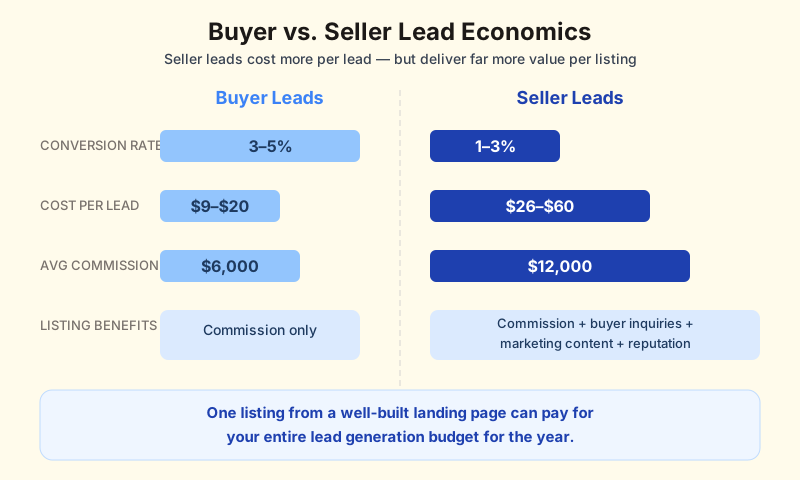
Seller landing pages are a completely different challenge. You are asking a homeowner to raise their hand and say, "I might sell my most valuable asset." That is a high-stakes, emotionally loaded decision, and the conversion dynamics reflect it. Where buyer lead pages in real estate convert at 3–5%, seller pages sit at 1–3% unless you know exactly what you are doing. Seller leads also cost more to acquire: $26–$60 per lead versus $9–$20 for buyers, according to 2026 channel benchmarks.
But here is the upside most agents miss: seller leads are worth dramatically more. A single listing generates your commission, triggers buyer inquiries, produces marketing content, and builds your reputation in that neighborhood. One listing from a well-built landing page can pay for your entire lead generation budget for the year.
The problem with most seller landing pages is that they are built like buyer pages with different copy. A headline swap from "Search Homes" to "What's My Home Worth?" and the same generic form underneath. That is not a seller conversion strategy. That is a cosmetic change on a misaligned framework.
This guide gives you the complete system: what makes seller pages convert, the five offers that actually work, which platforms to use, how to design forms that do not scare homeowners away, and the follow-up sequence that turns submissions into listing appointments. Everything is backed by data: conversion benchmarks, A/B test results, and real ROI calculations you can use to justify the investment.
2. The Anatomy of a Seller Landing Page That Actually Converts
High-converting seller landing pages follow a consistent structure. This is not a guess; it is what the data shows after analyzing thousands of real estate landing pages across platforms like Leadpages, Carrot, Unbounce, and custom agent sites. Pages with fewer than 10 elements convert at roughly twice the rate of pages with 40 or more elements. Simplicity wins.
Here is the five-section framework that top-performing seller pages use:
Section 1: The Hero (Outcome-Focused Headline)
Your headline is the most important element on the page. It determines whether a homeowner keeps reading or bounces. Headlines that focus on the outcome the seller wants ("Find Out What Your Home Is Worth in 60 Seconds") consistently outperform headlines that describe what you do ("Professional Home Valuations by [Agent Name]").
The best seller page headlines hit one of three triggers:
- Curiosity: "Your neighbors' homes sold for more than you think."
- Financial clarity: "See what you'd actually walk away with after selling."
- Speed and ease: "Get your home's value in under a minute, no strings attached."
Pair the headline with a subheadline that addresses the biggest fear. For sellers, that fear is usually one of three things: they will underprice their home, the process will be disruptive, or they will get locked into an obligation. A subheadline like "Free, instant estimate. No commitment, no agent calls unless you want them" neutralizes all three.
Use a high-quality image of a real local property or neighborhood, not a generic stock photo of a house with a "SOLD" sign. Homeowners are visual. A recognizable local image tells them this page is for them, not for every zip code in America.
Section 2: Trust Signals (Placed Where Doubt Lives)
Most agents put their credentials at the bottom of the page. That is backwards. Trust signals belong near the form, exactly where a homeowner hesitates and thinks, "Do I really want to give this person my information?"
The trust signals that move the needle for seller leads:
| Trust Signal | Where to Place It | Why It Works |
|---|---|---|
| Google/Zillow review rating (4.5+) | Directly above or beside the form | Third-party validation (you did not write these) |
| Number of homes sold in the area | Hero section or above form | Proves local expertise and transaction volume |
| Average days on market vs. area average | Value proposition section | Quantifies your competitive advantage |
| Client testimonial (short, specific) | Adjacent to form fields | Social proof from someone like them |
| "No obligation" or "Free" badge | On or near the CTA button | Reduces perceived risk of submitting |
The Larson Real Estate Team does this exceptionally well. Their seller landing page combines a home value estimate with a net proceeds analysis, surrounded by client reviews. The messaging frames it as "see what you'd actually keep" rather than "get a valuation." That reframe alone shifts the conversation from abstract to concrete, which is exactly what sellers want.
Section 3: The Value Explanation (What They Get)
Sellers will not fill out your form unless they understand what they receive in return. "Get a free home valuation" is too vague. Tell them exactly what they will get:
- A customized market report showing what comparable homes in their neighborhood sold for in the last 90 days
- An estimated home value range based on current market conditions, not a Zestimate
- A selling timeline showing how long homes like theirs are currently taking to sell
Keep this to three deliverables maximum. More than three and you dilute the offer. Less than two and it feels thin. Three creates a sense of thoroughness without overwhelming the visitor.
Use a three-step process visual: "Tell us about your home → Get your custom report → Decide your next move." This technique works because it makes the entire interaction feel predictable and low-risk. The homeowner can see the entire process before committing, and step three ("decide your next move") reinforces that they stay in control.
Section 4: Objection Handling (Without Calling It an FAQ)
Do not label a section "Frequently Asked Questions." That format feels generic and bolted on. Instead, weave common objections into the page naturally:
- "I'm not ready to sell yet." Address this with a line like: "Most homeowners who request a valuation are 6–18 months away from selling. This is an information-gathering step, not a commitment."
- "Will I get bombarded with calls?" "We'll send your report by email. No cold calls, no pressure. If you want to talk, reply to the email."
- "How is this different from Zillow?" "Zillow's Zestimate has a median error of 6.9%. Our analysis uses actual local sales data and adjusts for your home's specific features and condition."
These are not FAQ answers. They are conversion copy that removes barriers. Place them between the value proposition and the form, or as short sentences near the form fields.
Section 5: The CTA (Repeated and Specific)
Your call-to-action button should appear at least twice on the page: once in the hero section and once after the value explanation or objection handling section. The Altman Brothers Team takes this further. Their seller page walks through the entire selling process before placing a "Help Me Sell" button at the bottom. By the time a visitor reaches it, they have been educated on what the process looks like, which makes clicking the button feel like a natural next step rather than a leap of faith.
CTA button text matters more than most agents realize. Generic "Submit" buttons are conversion killers. Specific, benefit-oriented language consistently outperforms:
| CTA Text | Conversion Impact | Best Paired With |
|---|---|---|
| "Get My Home Value" | Highest volume | Home valuation offer |
| "Send My Market Report" | Strong for pipeline building | Monthly market report offer |
| "Get the Selling Plan" | Higher intent leads | Free selling consultation offer |
| "Book My Valuation Call" | Highest intent, lower volume | Premium service positioning |
| "See My Options" | Good for early-stage sellers | Exploratory "should I sell?" offer |
3. Five Seller Offers That Generate Leads (Ranked by Intent Level)
Not all seller leads are the same. A homeowner who wants to know if there is a buyer for their home is in a completely different headspace than one who needs to sell in 30 days. Your landing page offer determines which type of seller you attract, and your follow-up needs to match.
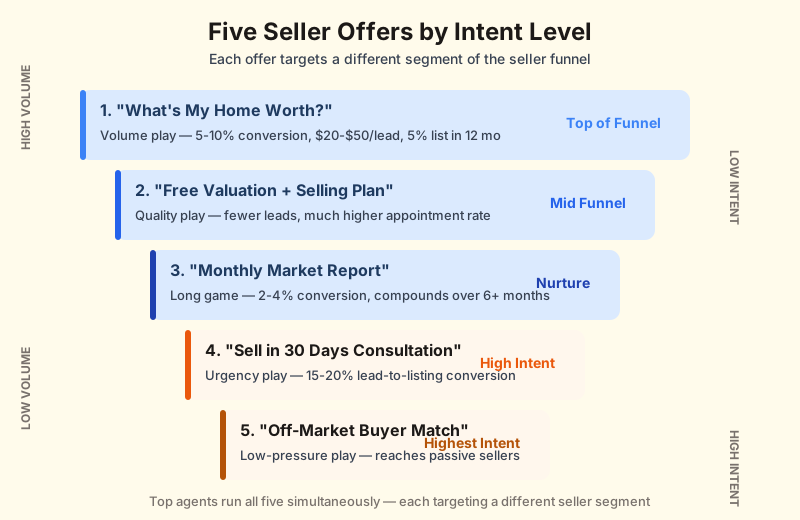
Here are the five offers that consistently generate seller leads, ranked from highest volume (lowest intent) to lowest volume (highest intent):
Offer 1: "What's My Home Worth?" (The Volume Play)
This is the most common seller lead offer and for good reason: homeowner curiosity about home values is practically unlimited. People check their home's value the way they check the weather: regularly, casually, and without any immediate plan to act. That means you will get a lot of leads, but most are 12–18 months from selling.
The conversion math is straightforward. A well-built "What's My Home Worth?" page converts at 5–10% of visitors into leads. Of those leads, roughly 5% will list within 12 months with proper nurturing. On 25 leads per month, that is 15 listings per year, which is a full-time business for most agents. Our home valuation funnel guide covers the full pipeline from ad to listing appointment.
| Metric | Typical Range | Top Performer Range |
|---|---|---|
| Landing page conversion rate | 3–5% | 7–10% |
| Cost per lead (Facebook) | $20–$50 | $8–$25 |
| Lead-to-listing rate (12 months) | 2–3% | 5–8% |
| Average nurture timeline | 12–18 months | 6–12 months |
When to use this offer: When you are building a pipeline from scratch and need volume. This is the top-of-funnel workhorse. Pair it with a long-term email drip that delivers monthly market updates. Do not try to close these leads on the first call.
Offer 2: "Free Home Valuation + Selling Plan" (The Quality Play)
Adding a "selling plan" or "selling roadmap" to a basic valuation offer increases lead quality dramatically. The homeowner who wants a selling plan is not idly curious. They are at least considering a timeline. You will get fewer leads, but a much higher percentage will convert to appointments.
The key to making this offer work is delivering on the promise. When someone requests a "selling plan," send them a personalized document that includes their home's estimated value, recommended list price, estimated net proceeds after closing costs and commission, suggested prep work, and a realistic timeline. That document becomes your pre-listing presentation and positions you as the obvious choice when they are ready to move forward. Our listing presentation guide covers the complete framework for converting that appointment into a signed agreement.
When to use this offer: When you want quality over quantity and have the capacity to deliver personalized reports within 24 hours. This is ideal for agents who would rather work 10 strong leads than 50 cold ones.
Offer 3: "Monthly Neighborhood Market Report" (The Long Game)
This offer trades immediate lead volume for long-term pipeline building. You are asking homeowners to subscribe to ongoing market data for their specific neighborhood. The conversion rate per page visit is lower (2–4%), but the leads you get are self-selecting into a long-term relationship with you.
The power of this approach is compounding. After 6 months of delivering monthly reports, you are the first agent a homeowner thinks of when they decide to sell. You have demonstrated expertise, consistency, and local knowledge, all without a single cold call. This is geographic farming in digital form.
When to use this offer: When you are farming a specific neighborhood or zip code and want to build dominance over time. Pair this with direct mail that drives traffic to the landing page. A postcard with a QR code linking to the report signup is a high-ROI combination.
Offer 4: "Sell in 30 Days Consultation" (The Urgency Play)
This offer targets the smallest but most valuable segment: homeowners who need to sell quickly. Divorce, job relocation, financial pressure, inherited property. These sellers are not browsing. They are searching for "how to sell my house fast" and they want someone who can deliver speed and certainty.
The landing page for this offer should emphasize your track record of fast sales: average days on market, percentage of homes sold within 30 days, and testimonials from clients who had tight timelines. The form can ask for more information than the other offers (including timeline and reason for selling) because high-intent sellers are willing to share more when they need help now.
When to use this offer: When you are running Google Ads targeting high-intent keywords like "sell my house fast [city]" or "need to sell house quickly." The cost per click is higher ($5–$10), but the lead-to-listing conversion rate can hit 15–20% because these sellers are not shopping around.
Offer 5: "Off-Market Buyer Match" (The Low-Pressure Play)
This is the most underused seller offer and potentially the most interesting. The pitch: "See if there's a buyer for your home without listing it publicly." This reframes selling as a low-risk exploration rather than a commitment. Homeowners who are not ready to list will engage with this offer because it feels safe. There is no sign in the yard, no open houses, no disruption to their daily life.
The genius of this approach is that once a homeowner sees that qualified buyers exist for their home, the psychological shift from "maybe someday" to "maybe now" happens naturally. You are not convincing them to sell. You are showing them evidence that the market wants their home. That is a much easier conversation than a traditional listing pitch.
When to use this offer: When you are targeting luxury markets or neighborhoods with low inventory. This offer works especially well in areas where homeowners would sell if the right offer came along but are not actively listing because they do not want the hassle. For agents building seller lead generation strategies around passive sellers, this is a secret weapon.
Ready to build a seller landing page that converts?
RobinFlow gives you a question-flow landing page, automated follow-up, and CRM — all in one platform built for real estate agents.
4. Form Design: How Many Fields Is Too Many?
The form is where conversions live or die. Every additional field you add to a landing page form reduces your conversion rate. This is one of the most well-documented patterns in digital marketing. The data is unambiguous: landing page conversion rate hits 10% when you ask for only three pieces of information and drops below 5% at five or more fields.
For seller landing pages specifically, here is the optimal form structure:
The Three-Field Starter (Highest Conversion)
| Field | Why It Is Needed | Conversion Impact |
|---|---|---|
| Property address | Required to deliver the valuation | Expected (sellers know you need this) |
| Email address | Delivery channel for the report | Low friction (standard for digital offers) |
| Name (first only) | Personalization of follow-up | Minimal friction (people expect this) |
This three-field approach maximizes your conversion rate. You will generate the most leads, but some will be low quality: wrong email addresses, curious neighbors, people with no intention of selling. That is the trade-off.
The Four-Field Sweet Spot (Balanced)
Adding a phone number field (marked as optional) gives you a contact channel for the leads who are most engaged. The key word is "optional." Making phone number required drops conversion rates by 25–40%, but making it optional typically reduces conversion by only 5–8% while giving you phone numbers for 30–40% of your leads. Those are the ones most likely to convert.
The Multi-Step Alternative (Higher Quality)
Instead of asking all questions upfront, break the form into two steps. Step one collects the address and email (the minimum needed to deliver value). Step two, shown after submission, asks optional qualifying questions: "When are you thinking of selling?" and "What's your main reason for considering a move?"
Multi-step forms work because of a psychological principle called commitment escalation. Once someone completes step one, they have invested effort and are more likely to continue. Carrot's A/B test data shows opt-in forms on their landing pages achieve approximately 30% conversion rates using this approach. The first step captures the lead. The second step qualifies them.
The qualifying information from step two is gold for your follow-up sequence. A lead who says they want to sell in the next 3 months gets a different follow-up cadence than one who says 12+ months. Without that data, you are treating every lead the same, which means you are either too aggressive with long-term leads or too passive with ready-now sellers.
What Kills Form Conversions
Knowing what not to do is just as important as knowing the optimal setup. These are the most common form mistakes on seller landing pages:
- Requiring phone number without marking it optional: Drops conversion 25–40%. Homeowners are wary of sales calls.
- "Submit" as your button text: This is the single easiest fix with the highest impact. "Submit" converts significantly lower than specific language like "Get My Home Value." A/B tests show CTA text changes alone can lift conversion up to 104%.
- Lengthy disclaimers above or below the form: Legal text about data usage, privacy policies, and terms of service creates friction. If you must include them, use a small-text link, not a paragraph.
- CAPTCHA on the form: Unless you are getting genuine bot traffic, CAPTCHA adds friction for every single visitor to solve a problem that affects a tiny percentage. Use honeypot fields instead.
- Asking for the homeowner's full address including unit number, city, state, and zip as separate fields: Use a single address autocomplete field. Five separate address fields make a three-question form feel like a ten-question form.
5. Mobile Optimization: Why Mobile Converts 40% Lower (and How to Fix It)
Here is a stat that should change how you think about your landing pages: mobile drives 83% of real estate website traffic, but converts at 2.9% compared to 4.8% on desktop, nearly two full percentage points lower, a roughly 40% drop in conversion rate. On a page getting 1,000 monthly visitors, that gap represents roughly 16 lost leads per month. At $40 per lead, you are leaving $640 on the table every month because your page does not work well on a phone.
The mobile conversion gap is not about mobile users being less interested. It is about mobile pages being harder to use. Small text, tiny form fields, slow load times, and buttons that require zooming. These are the real conversion killers, and they are all fixable.
The Five Mobile Fixes That Matter
1. Load time under 3 seconds. 53% of mobile users abandon pages that take more than 3 seconds to load. Every second of additional load time drops conversion by approximately 7%. Strip out heavy images, lazy-load below-fold content, and use a content delivery network. Test your page speed with Google PageSpeed Insights. Anything below 90 on the mobile score needs attention.
2. Thumb-friendly form fields. Form fields should be at least 48px tall with 12px spacing between them. A homeowner should be able to tap each field with their thumb without accidentally hitting the wrong one. Use large, padded input fields that are easy to tap on a screen held with one hand.
3. Single-column layout. Multi-column layouts that look great on desktop become a scrolling mess on mobile. Use a single-column layout where every element stacks vertically. The hero, the value proposition, the trust signals, the form, all in one clean column.
4. Sticky CTA button. On mobile, the CTA button should stay visible as the user scrolls. A fixed bottom bar with "Get My Home Value" means the homeowner never has to scroll back up to find the form. This single change can improve mobile conversion by 20–30% because it eliminates the friction of scrolling and searching.
5. Click-to-call for phone fields. If your form asks for a phone number, add a click-to-call option as an alternative. Some mobile users would rather tap a button and call you directly than type their phone number into a form. Give them that option.
Mobile vs. Desktop: What to Prioritize
| Element | Desktop Approach | Mobile Approach |
|---|---|---|
| Hero image | Full-width, high-resolution | Compressed, 400px wide max, or background only |
| Form placement | Right sidebar, always visible | After hero and value prop, or sticky bottom CTA |
| Trust signals | Horizontal row of badges | Stacked vertically, smaller text |
| Testimonials | Full quotes with photos | Short pull quotes, carousel if needed |
| CTA button size | Standard button (200px wide) | Full-width, 56px tall, high contrast |
| Video content | Autoplay (muted) works well | Thumbnail with play button (conserve data) |
6. Platform Comparison: Choosing the Right Landing Page Tool
The landing page platform you choose affects everything: your conversion rate, your design options, your testing capabilities, and your monthly costs. There is no single best platform for every agent. The right choice depends on your budget, your team size, and how much time you want to spend building pages versus paying for done-for-you templates.
Below is an honest comparison of the platforms real estate agents actually use, with real pricing and real trade-offs:
| Platform | Monthly Cost | Best For | A/B Testing | Real Estate Templates |
|---|---|---|---|---|
| Leadpages | $37–$79 | Solo agents on a budget | Pro plan only ($79) | Yes, general real estate |
| Unbounce | $90+ | Agents spending $100K+/yr on ads | All plans + Smart Traffic AI | Limited, more generic templates |
| Carrot | $84–$169 | Investors and wholesalers (SEO focus) | Limited | Yes, motivated seller specific |
| ClickFunnels | $127+ | Multi-step seller funnels | Yes | Community-shared templates |
| AgentFire | $129 + $39 add-ons | Full website + landing pages | No | Yes, agent-specific with IDX |
| Real Geeks | $299+ | Teams needing all-in-one platform | Limited | Yes, built-in home valuation |
| Placester | $119 | NAR members wanting done-for-you | No | Yes, structured templates |
How to Choose: The Decision Framework
If you are a solo agent spending under $500/month on ads: Start with Leadpages at $37/month. The drag-and-drop builder is intuitive enough to create a solid seller landing page in an afternoon. Upgrade to the $79 Pro plan when you are ready to A/B test headlines and form layouts. The ROI on A/B testing easily justifies the price increase once you have consistent traffic.
If you are an investor or target "sell my house fast" searches: Carrot is purpose-built for this. Their templates rank well for motivated seller keywords. In fact, 30% of the top Google rankings for motivated seller terms are Carrot sites. At $84–$169/month, it is more expensive than Leadpages, but the SEO advantage can generate leads without any ad spend. One Carrot user in Florida generated 50+ motivated seller leads in 3 months from organic search alone.
If you run a team and need CRM + landing pages in one system: Real Geeks at $299/month or AgentFire at $129 + add-ons give you an integrated system. The advantage is that leads flow directly into your CRM without third-party integrations. The disadvantage is less flexibility in page design and fewer A/B testing options. For a deeper look at how different CRMs handle lead routing and follow-up, see our real estate CRM comparison.
If you are spending serious money on ads and need data-driven optimization: Unbounce at $90+/month is the power tool. Their Smart Traffic AI automatically routes visitors to the highest-converting page variant, so no manual A/B test management is needed. This is overkill for agents spending $500/month on ads, but for teams spending $5,000+/month, the conversion lift pays for itself many times over.
If you want a multi-step funnel rather than a single page: ClickFunnels at $127/month excels at building sequences: landing page to quiz to booking page to confirmation. If your strategy involves walking homeowners through a multi-step qualification process before requesting contact info, ClickFunnels handles the workflow better than landing-page-only tools.
The Hidden Cost: Integration and Maintenance
Platform pricing is not the full picture. Factor in these costs:
- CRM integration: Does your landing page tool push leads directly into your CRM, or do you need Zapier ($19–$49/month) to connect them?
- Domain and hosting: Most platforms include hosting, but some (like Carrot's WordPress-based system) may need additional hosting costs.
- Design time: A "free template" that takes 20 hours to customize is not free. Factor in your time or a VA's hourly rate.
- Ongoing optimization: A/B testing requires traffic and time. Budget for 2–4 hours per month reviewing results and making changes.
Skip the Platform Comparison — Start Free
RobinFlow combines your landing page, follow-up automation, and CRM in one tool. No code, no design skills, launch in minutes.
Get Started Free7. Speed to Lead: Why Your Landing Page Is Only Half the Battle
Your landing page captured a lead. A homeowner entered their address, typed their email, and hit "Get My Home Value." What happens next determines whether that lead turns into a listing appointment or becomes another name in a database that nobody follows up with.
The data on speed to lead is brutal. Calling a lead within the first minute boosts conversion by 391%. Leads are 100 times more likely to qualify if contacted within 5 minutes compared to 30 minutes. And conversion drops 8 times after just 5 minutes of delay. Not 5 hours. Five minutes.
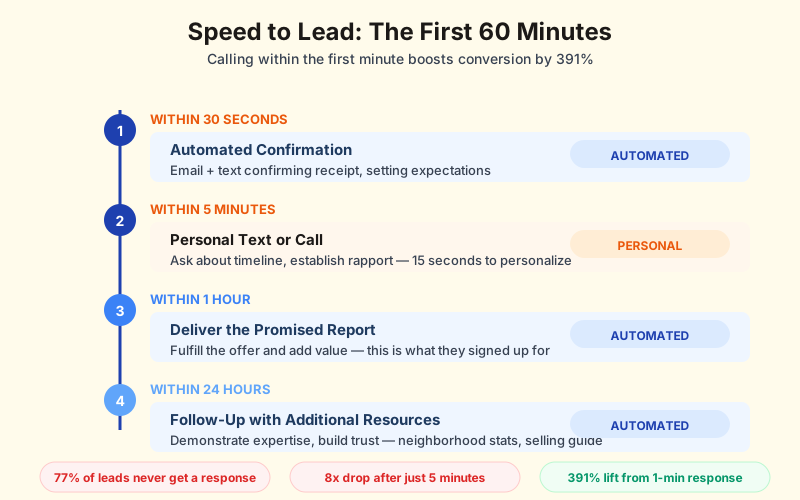
Yet the industry average is abysmal: 57% of companies take a full week to respond to online inquiries. And 77% of leads never receive a response at all. If you can respond faster than your competitors (and the bar is disturbingly low), you win by default.
The First-60-Minutes Response Sequence
Here is the follow-up sequence that top-performing agents use immediately after a landing page submission:
| Timing | Action | Channel | Goal |
|---|---|---|---|
| Within 30 seconds | Automated confirmation | Email + Text | Confirm receipt, set expectations |
| Within 5 minutes | Personal text or call | Phone/Text | Ask about timeline, establish rapport |
| Within 1 hour | Deliver the promised report | Fulfill the offer and add value | |
| Within 24 hours | Follow-up with additional resources | Demonstrate expertise, build trust |
The 30-second automated confirmation is non-negotiable. It does two things: tells the homeowner their submission was received (reducing the chance they submit to your competitor), and sets expectations for what happens next ("You'll receive your custom market report within the hour"). Every major CRM and most landing page platforms can trigger this automatically. If your system cannot send an instant confirmation, fix that before spending another dollar on ads.
The 5-minute personal contact is where most agents fail, and where the winners separate themselves. This does not need to be a scripted sales call. A simple text: "Hi [Name], this is [Agent]. I got your request for a home value on [Street Name]. I'm pulling comparable sales in your area now. Quick question: is there a timeline you're working toward, or are you just exploring?" That text takes 15 seconds to personalize and send. It positions you as responsive, human, and not pushy. Texting a qualified lead can increase conversions over 100% compared to email-only follow-up.
Why Automation Is Not Optional
75% of top-performing real estate agents use automation for their follow-up sequences. The reason is simple math: if your landing page generates 25 leads per month, you cannot manually respond to each one within 5 minutes, especially when leads come in at 10 PM, during showings, or on weekends. Automation handles the instant response. You handle the personal touch when you are available.
The minimum automation stack for a seller landing page:
- Instant email autoresponder: Triggered on form submission. Confirms receipt, previews the report, includes a scheduling link.
- Instant text notification to you: Your phone buzzes the moment a lead comes in. You see their name, address, and any qualifying answers from the form.
- Automated text to the lead: A friendly, personalized text within 60 seconds. "Hi [Name], got your request. Working on your report now. What's the best time to chat?"
- Delayed email sequence: If no response to the initial outreach, trigger a 3-email sequence over the next 7 days with increasing value (market report → neighborhood stats → selling timeline guide).
This stack costs nothing if your CRM already supports automation (most do). If it does not, tools like Follow Up Boss or automated follow-up sequences can bolt this onto any landing page platform within an afternoon.
8. The Follow-Up Sequence That Turns Leads Into Listings
Landing page leads convert to listings at 1–3% on average. That number sounds discouraging until you break it down: the 1% figure comes from agents who treat landing page leads like door-knock leads (one contact attempt, then forget about them). The 3% comes from agents with structured follow-up sequences. And the top performers (agents converting at 5–8%) use long-term nurture campaigns that stay in front of sellers for 12–18 months.
The difference between 1% and 5% conversion on 300 annual leads is the difference between 3 listings and 15 listings. At $12,000 average commission, that is $36,000 versus $180,000 from the same landing page. The follow-up is where the money lives.
Week 1: The Fast Follow-Up (Days 1–7)
The first week is about speed, value delivery, and establishing yourself as the expert. Here is the day-by-day sequence:
Day 1 (within minutes): Automated confirmation email and text. Deliver the promised report within 1 hour. Make the personal outreach call or text within 5 minutes.
Day 2: If no response to day 1 outreach, send a short email: "Just wanted to make sure you received your market report for [Address]. Happy to walk through the numbers with you if any questions come up." No pressure. Just checking in.
Day 4: Send a piece of additional value, like a neighborhood pricing trend ("Homes in your area are selling for 3% above asking on average this month") or a relevant blog post about selling timelines. This email is about demonstrating expertise, not asking for a meeting.
Day 7: Final week-one touchpoint. A brief text or email: "Hi [Name], just sent an updated look at recent sales near [Street]. Let me know if you'd ever like to talk through your options. No rush." The key phrase is "no rush." Seller leads need to feel zero pressure.
Month 1–3: The Nurture Phase
Most seller leads are not ready to list immediately. The nurture phase keeps you top-of-mind without being annoying. The cadence shifts from daily to weekly to bi-weekly:
| Frequency | Content Type | Example Subject Lines |
|---|---|---|
| Weekly (weeks 2–4) | Market updates for their area | "3 homes on [Street] sold this week, here's what they got" |
| Bi-weekly (months 2–3) | Educational content | "The #1 repair that boosts sale price (and 3 that don't)" |
| Monthly (months 4+) | Market snapshots + personal note | "Your neighborhood's February numbers are in" |
The content of these emails matters more than the frequency. Every email should include at least one piece of locally relevant data: a specific sale in their neighborhood, a pricing trend in their zip code, or a market stat that relates to their home type. Generic "5 Tips to Sell Your Home" content gets deleted. Specific "Homes in Stonecrest are selling 8% above list price this spring" gets read.
Month 3–12: The Long Nurture
This is where most agents give up, and where the agents with systems keep winning. The average online seller lead takes 12–18 months to convert. That means the lead who came in through your landing page in January might not be ready to list until next fall. If you stop following up at month 3, you lose the listing to the agent who sent a market update in month 10.
The long nurture should be mostly automated with occasional personal touches:
- Monthly automated market report: Personalized to their zip code or neighborhood. Include median sale price, days on market, inventory levels, and price trend direction.
- Quarterly personal email: A genuine, non-templated email from you. "Hey [Name], your neighborhood just hit a new median price. If selling is still on your radar, I'd love to update your home's estimated value. Either way, hope you're doing well."
- Trigger-based outreach: When a home on their street sells, send a quick note: "Your neighbor at [address] just sold for $X. That's relevant to your home's current value. Want an updated estimate?"
The trigger-based outreach is the highest-converting touchpoint in the entire sequence. It is specific, timely, and relevant. A homeowner who ignored your last 6 emails will respond to "your neighbor just sold" because it is personal and concrete.
9. A/B Testing Playbook: What to Test First (and What to Ignore)
A/B testing is how you systematically improve your landing page conversion rate over time. The concept is simple: create two versions of a page element, split your traffic between them, and measure which one converts more leads. The challenge is knowing what to test first, because testing the wrong thing wastes time and traffic.
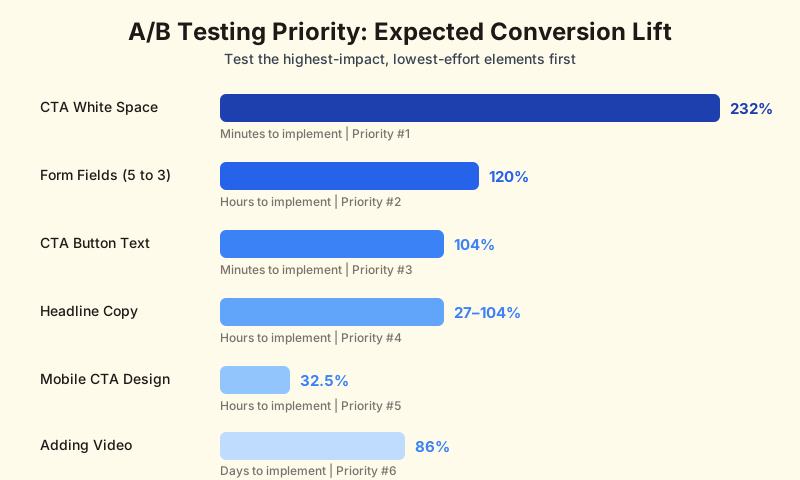
The A/B testing priority matrix below ranks tests by expected conversion lift, complexity, and time to implement:
| Test Element | Expected Lift | Effort Level | Implementation Time | Priority |
|---|---|---|---|---|
| White space around CTA button | Up to 232% | Low | Minutes | 1 (Test first) |
| Form field reduction (5 → 3 fields) | Up to 120% | Low | Hours | 2 |
| CTA button text | Up to 104% | Low | Minutes | 3 |
| Headline copy | 27–104% | Low | Hours | 4 |
| Mobile-specific CTA design | Up to 32.5% | Medium | Hours | 5 |
| Adding video | ~86% | Medium | Days | 6 |
Priority 1: White Space Around the CTA
This test takes minutes and can deliver the biggest lift. Adding 20–40px of padding around your CTA button, separating it visually from surrounding text and form fields, makes it stand out as the primary action on the page. It sounds trivially simple, and it is. But the data shows up to 232% conversion improvement. Start here.
Priority 2: Form Field Reduction
If your form currently has 5 or more fields, test reducing to 3. Remove the phone number field entirely or make it optional. Remove "last name" if you have separate first/last fields. If you collect the address as multiple fields (street, city, state, zip), switch to a single autocomplete field. These changes can lift conversion up to 120% and take an afternoon to implement.
Priority 3: CTA Button Text
Test your current button text against a specific, benefit-oriented alternative. If you are using "Submit," test "Get My Home Value." If you are using "Get My Home Value," test "Send My Free Report." These are 5-minute changes that can lift conversion up to 104%. Run the test for at least 200 visitors per variant before drawing conclusions.
Priority 4: Headline Copy
Test your headline against a variant that emphasizes a different trigger. If your current headline is curiosity-based ("What's your home really worth?"), test a financial clarity headline ("See what you'd walk away with after selling"). Headline tests take longer to show results because the effect is distributed across the entire page, but the potential lift of 27–104% makes them worth the patience.
What Not to Test
Equally important: what you should skip testing because the expected lift is not worth the effort.
- Font family changes: Switching from Arial to Georgia will not move your conversion rate. Do not waste traffic on this.
- Button color: The "green button vs. red button" debate is one of the biggest myths in conversion optimization. Color matters only in terms of contrast with surrounding elements, not the specific hue. If your button blends into the background, fix the contrast. Do not run an A/B test on blue versus orange.
- Background images: Unless your current background is actively hurting readability (dark text on a dark image), background image tests rarely produce meaningful results.
- Navigation bar presence: On landing pages, the answer is always "remove the navigation." Do not test this; just do it. Navigation links give visitors an exit before they convert.
How Much Traffic You Need
A/B testing requires statistical significance, which requires traffic. The table below shows roughly how long tests take at different traffic levels:
| Monthly Page Visitors | Base Conversion Rate | Minimum Test Duration | Detectable Lift |
|---|---|---|---|
| 500 | 5% | 4–6 weeks | 30%+ lift only |
| 1,000 | 5% | 2–3 weeks | 20%+ lift |
| 2,500 | 5% | 1–2 weeks | 10%+ lift |
| 5,000+ | 5% | 3–7 days | 5%+ lift |
If your landing page gets fewer than 500 visitors per month, A/B testing is probably not your best use of time. Focus on getting more traffic first, then optimize the page once you have enough data to make statistically valid decisions. For agents scaling their traffic through paid channels, understanding your lead generation costs by channel will help you allocate budget to the sources that deliver enough volume for meaningful tests.
Stop guessing. Start testing.
RobinFlow tracks every lead source and conversion so you know exactly what is working — and what to test next.
10. ROI Framework: How to Calculate What a Seller Landing Page Is Actually Worth
Agents resist investing in landing pages because they cannot see the math. "Will this actually make me money?" is a fair question, and the answer requires honest numbers. Here is the framework for calculating the ROI of a seller landing page, with real benchmarks you can plug your own numbers into.
The Core Formula
Seller landing page ROI comes down to four numbers:
- Traffic: How many people visit your landing page per month
- Conversion rate: What percentage of visitors become leads
- Lead-to-listing rate: What percentage of leads become listings over 12 months
- Commission per listing: Your average commission on a listing
Multiply those together, subtract your costs, and you have your ROI. Simple in concept, trickier in execution.
Real-World ROI Scenario
Consider a realistic scenario for an agent spending $1,000/month on Facebook ads driving traffic to a seller landing page:
| Metric | Conservative | Moderate | Top Performer |
|---|---|---|---|
| Monthly ad spend | $1,000 | $1,000 | $1,000 |
| Cost per click | $3.00 | $2.50 | $2.00 |
| Monthly page visitors | 333 | 400 | 500 |
| Landing page conversion rate | 3% | 5% | 8% |
| Monthly leads | 10 | 20 | 40 |
| Cost per lead | $100 | $50 | $25 |
| Annual leads | 120 | 240 | 480 |
| Lead-to-listing rate (12 months) | 2% | 4% | 7% |
| Annual listings from leads | 2.4 | 9.6 | 33.6 |
| Avg. commission per listing | $10,000 | $12,000 | $12,000 |
| Annual commission from leads | $24,000 | $115,200 | $403,200 |
| Annual ad spend | $12,000 | $12,000 | $12,000 |
| Annual platform cost | $444 | $948 | $948 |
| Net ROI | $11,556 | $102,252 | $390,252 |
| Return on ad spend | 2:1 | 9.6:1 | 33.6:1 |
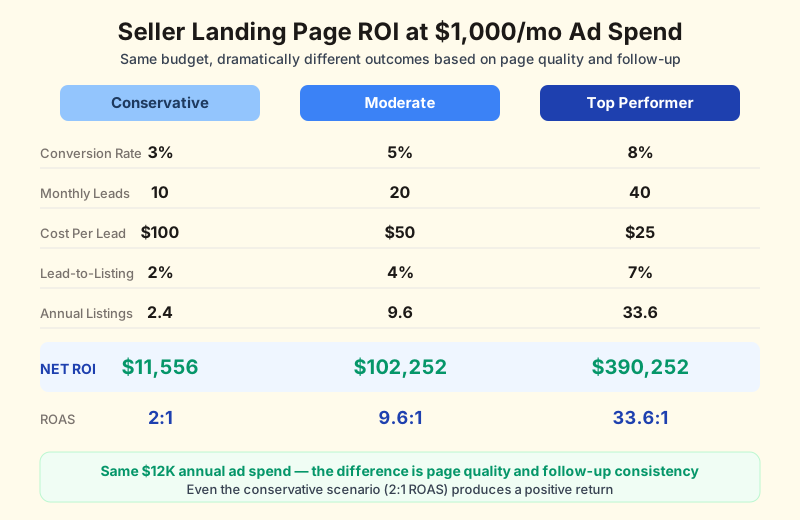
Even the conservative scenario (3% conversion, 2% lead-to-listing rate) produces a positive return. The key insight is in the difference between conservative and top performer: the ad spend is identical. The difference is landing page quality (3% vs. 8% conversion) and follow-up quality (2% vs. 7% lead-to-listing). Those are both within your control.
Dan Henry demonstrated this extreme leverage in practice: $441 in Facebook ad spend generated $900,000 in condo sales. His return was approximately 2,040:1. While that result is exceptional, the principle holds. A high-converting landing page paired with a strong follow-up system creates disproportionate returns relative to ad spend.
The Break-Even Calculation
If the big ROI numbers feel abstract, here is a simpler way to think about it: how many listings do you need from your landing page to break even on your costs?
| Monthly Budget | Annual Cost | Avg. Commission | Listings to Break Even |
|---|---|---|---|
| $500/mo (ads + platform) | $6,000 | $10,000 | 0.6 (less than 1) |
| $1,000/mo | $12,000 | $10,000 | 1.2 |
| $2,000/mo | $24,000 | $10,000 | 2.4 |
| $3,000/mo | $36,000 | $12,000 | 3.0 |
At $500/month total investment, you need less than one listing per year to break even. At $1,000/month, you need just over one. Even agents with modest conversion rates and small budgets can make the math work, which is why landing pages are one of the highest-ROI investments in real estate lead generation.
Tracking Your Numbers
You cannot improve what you do not measure. At minimum, track these metrics monthly:
- Page visitors: Total unique visitors to your landing page (available in Google Analytics or your landing page platform)
- Leads generated: Number of form submissions
- Conversion rate: Leads ÷ visitors × 100
- Cost per lead: Total monthly spend (ads + platform) ÷ leads
- Lead source attribution: Which traffic source (Facebook, Google, organic, direct) produced each lead
- Lead-to-appointment rate: How many leads converted to an initial consultation
- Lead-to-listing rate: How many leads became listings (track over 12 months)
Build a simple spreadsheet that you update monthly. After 6 months, you will have enough data to optimize your spending. You might discover that Google Ads leads cost 3 times more but convert at 4 times the rate, making them cheaper per listing even though the cost per lead is higher. That insight only comes from tracking.
11. Common Mistakes That Kill Seller Landing Page Conversions
After covering what works, here is what does not. These are the mistakes that show up again and again on seller landing pages, and every one of them is fixable.
Mistake 1: Sending Paid Traffic to Your Homepage
This is the most expensive mistake agents make. Your homepage has navigation links, blog posts, about sections, IDX search, contact forms, social media buttons. That is a dozen different actions competing for the visitor's attention. A landing page has one action: fill out the form. Companies with 10–15 landing pages see 55% more leads than those with fewer than 10 pages. Every ad campaign should point to a dedicated landing page, not your homepage.
The fix takes 30 minutes: build a single landing page on any platform (even a free one), remove all navigation, and point your ads there. You will see an immediate lift in conversion.
Mistake 2: Generic Copy That Could Be Any Agent in Any City
Your landing page copy should not be interchangeable with every other agent's page. If you can swap out your name and your city, and the page would work for any agent in the country, your copy is too generic. Sellers want to know that you understand their market specifically: local price trends, neighborhood dynamics, seasonal patterns, school districts, and buyer demand in their area.
The fix: Include at least two locally specific data points on every seller landing page. "Homes in [Neighborhood] are selling in an average of 27 days, 15 days faster than the [City] average." That sentence signals local expertise in a way that "I'm a top-rated agent" never will.
Mistake 3: No Social Proof, or Social Proof in the Wrong Place
Client testimonials on a seller landing page work, but only if they are placed near the form and are specific. "Great agent!" means nothing. "Sarah helped us get $45,000 above asking on our home in Ballantyne. From listing to closing in 18 days." means everything. Place that testimonial immediately above or below the form fields, where the visitor is weighing whether to submit their information.
Mistake 4: Slow Page Load Times
Every additional second of load time costs you conversions. The data is clear: 53% of mobile users abandon a page that takes more than 3 seconds to load. Yet most agents never check their landing page speed. The most common culprits: uncompressed images (especially hero images shot at 5MB+), third-party tracking scripts, embedded video that loads on page open rather than on click, and cheap hosting with slow server response times.
Run your landing page through Google PageSpeed Insights right now. If the mobile score is below 80, you are losing leads to load time. The fix is usually straightforward: compress images, defer non-critical scripts, and switch to lazy-loading for below-fold content.
Mistake 5: No Follow-Up System Connected
This one is painful because it means the landing page worked (you got the lead) and then you lost them through inaction. A landing page without automated follow-up is like a storefront without a cashier. The customer walked in, but nobody was there to help them. This is especially critical given that Facebook ad campaigns can generate leads around the clock, including nights and weekends when you are not at your desk.
The fix: Before you launch any landing page, set up at minimum an instant confirmation email, an instant text notification to yourself, and a 7-day email drip sequence. These three automations turn a landing page from a form into a system.
Mistake 6: Too Many Offers on One Page
A landing page that offers a home valuation AND a buyer search AND an agent consultation AND a downloadable guide is not a landing page. It is a homepage pretending to be one. Each offer dilutes the others. The visitor does not know which action to take, so they take none.
One page. One offer. One form. One CTA. If you have multiple offers, build multiple pages. This is the single most impactful principle in landing page design and the one most agents ignore.
Mistake 7: Ignoring the Thank-You Page
The thank-you page (what the visitor sees after submitting the form) is one of the most underutilized conversion opportunities. Most agents show a generic "Thanks! We'll be in touch." This wastes a moment of maximum engagement. The homeowner just took action, and they are receptive to a next step.
Use the thank-you page to:
- Invite them to schedule a call (embed your Calendly or scheduling tool)
- Share a relevant blog post or guide that adds more value
- Ask them to share the page on social media (Dan Henry improved secondary conversion dramatically by linking to a Facebook post on his thank-you page)
- Set expectations for what happens next: "Your custom market report will be in your inbox within 60 minutes."
12. Building Your First Seller Landing Page: Step by Step
If you have read this far and do not yet have a seller landing page, here is your action plan. This is designed to get you from nothing to a live, functional landing page in a single weekend. Not a perfect page, but a page that works, captures leads, and connects to a follow-up system.
Day 1 (Saturday): Build the Page
Step 1: Choose your platform and offer (30 minutes).
If you have never built a landing page before, start with Leadpages at $37/month. It has the gentlest learning curve and templates that get you 80% of the way there. Pick one offer. "What's My Home Worth?" is the safest starting point because it works across every market and every home price range.
Step 2: Write your copy (2 hours).
Use this template as your starting point and customize with your local data:
- Headline: "What's Your [City] Home Worth in 2026?"
- Subheadline: "Get a free, custom market report. No obligation, no surprise calls."
- Value bullets: (1) Comparable recent sales in your neighborhood. (2) Estimated value range based on current market conditions. (3) Average days on market for homes like yours.
- Trust signal: "[X] homes sold in [area] | [Rating] stars on Google/Zillow"
- CTA button: "Get My Home Value"
- Form fields: Address, Name, Email
Replace the brackets with your actual numbers. If you do not know your exact stats, use round numbers that are honest. "50+ homes sold" is better than an empty space.
Step 3: Build the page (2 hours).
Select a template, paste in your copy, upload a local area photo as the hero image, add your trust signals, and set up the form with 3 fields. Remove all navigation links. Preview on mobile. Adjust any elements that feel cramped or hard to tap. Publish to a subdomain or custom URL.
Step 4: Connect your CRM (1 hour).
Integrate the form with your CRM or email platform. If using Follow Up Boss, BoomTown, KvCORE, or Sierra Interactive, most landing page tools have native integrations. Otherwise, use Zapier to connect the form submission to your CRM's lead intake. Test the integration by submitting the form yourself and confirming the lead appears in your CRM.
Day 2 (Sunday): Build the Follow-Up
Step 5: Set up automated follow-up (2 hours).
In your CRM or email tool, create three automations:
- Instant confirmation email: "Thanks for requesting your home value report for [Address]. We're pulling the most recent comparable sales in your area now and will have your custom report in your inbox within 60 minutes."
- Lead notification to you: A text or email to your phone with the lead's name, address, and email. This is your cue to make the 5-minute personal outreach.
- Day 2–7 email drip: Three follow-up emails over the next week. Day 2: "Here's your custom report." Day 4: A neighborhood pricing trend. Day 7: "Any questions about the report? I'm here when you're ready."
Step 6: Test everything end-to-end (30 minutes).
Submit the form with a test email. Verify: (1) the confirmation email arrives instantly, (2) your CRM receives the lead, (3) your phone gets the notification, (4) the thank-you page displays correctly, and (5) the drip emails trigger on schedule. Do this test on both desktop and mobile. Fix anything that breaks.
Step 7: Drive your first traffic (1 hour).
You do not need to run ads yet. Start with free traffic sources to validate that the page works before spending money:
- Add the link to your email signature
- Post the link on your personal Facebook and Instagram profiles
- Send the link to your sphere of influence via text: "Just launched a free home value tool for [area]. Would love your feedback. [link]"
- Add the link to your Zillow, Realtor.com, and Google Business profiles
These free sources will generate your first 10–20 leads. Use those leads to practice your follow-up sequence, identify any friction in the process, and build confidence that the system works before scaling with paid traffic.
Week 2 and Beyond: Scale
Once you have validated the page and follow-up system with free traffic, scale with paid sources. Start with $10–$20/day on Facebook ads targeting homeowners in your service area. Use geographic targeting (radius around your farm area) and demographic targeting (homeowners, age 35+, homeownership likely). Let the campaign run for 2 weeks before making changes. Facebook's algorithm needs data to optimize.
After you have 200+ visitors, run your first A/B test. Start with the CTA button text, then test headline copy, then form length. Each test builds on the previous winner, and after 3–4 months of systematic testing, you will have a page that converts significantly better than what you started with.
Build Your Seller Landing Page This Weekend
RobinFlow walks you through setup step by step — question-flow design, automated follow-up, and CRM all included. Free to start.
Start Building Now13. Putting It All Together: Your Seller Landing Page System
If this guide has felt like a lot, here is the condensed version: the seven things that matter most, in order of impact:
- One page, one offer. Every seller landing page focuses on a single offer. No navigation, no distractions, no multiple CTAs. Pages with fewer than 10 elements convert at twice the rate of cluttered pages.
- Three-field forms. Address, name, email. Phone is optional. Conversion rate hits 10% with 3 fields and drops from there. Multi-step forms can qualify leads after the initial capture.
- Mobile-first design. 83% of your traffic is on mobile. Load time under 3 seconds. Full-width CTA button. Single-column layout. Test on your own phone before launching.
- Speed-to-lead follow-up. Automated confirmation within 30 seconds. Personal outreach within 5 minutes. Report delivered within 1 hour. Every minute of delay costs you conversion. Leads contacted in the first minute convert at 391% higher rates.
- Long-term nurture. 12–18 month email sequence with monthly market reports and quarterly personal touches. The difference between 1% and 5% lead-to-listing conversion is follow-up consistency, and that is the gap between 3 listings and 15 listings per year on the same lead volume.
- Systematic testing. One A/B test at a time, starting with CTA white space and button text. Even one test puts you ahead of 95% of agents who never test anything.
- Track cost per listing, not cost per lead. A $50 lead that becomes a $12,000 commission after 12 months of nurturing is one of the best investments in real estate. Shift your measurement from cost per lead to cost per listing, and the ROI becomes obvious. Our lead generation cost comparison guide breaks down cost per closed deal across every major channel.
The real estate industry spends billions on lead generation every year, and most of those leads are wasted, not because the leads are bad, but because the capture and follow-up systems are broken. A well-built seller landing page connected to a consistent follow-up sequence fixes both problems at once.
You do not need the most expensive platform, the fanciest design, or the biggest ad budget. You need a clear offer, a clean page, a fast response, and the discipline to follow up consistently for 12 months. That is the system that turns online clicks into listing appointments. The agents who build it will out-produce the ones who do not, and it starts with the first landing page you build this weekend.
If you are ready to build your first seller landing page with a question-flow design that guides homeowners through a conversation rather than a form, RobinFlow's onboarding walks you through setup in minutes. No code, no design skills, no guesswork. Just a system that converts visitors into qualified seller leads.